Clutch
 G2

A lot of the redesign kickoffs I run start with the same two worries, even when nobody says them out loud. The first is “will we lose our Google traffic?” The second is “how long is this going to drag on?” Both are fair. Most owners have heard a horror story about a relaunch that tanked a business, and most have lived through a project that stalled somewhere between the second mockup and the content nobody wrote.
I lead web design at SmartSites, so I see redesigns from the first questionnaire to the post-launch check. This is the whole process in the order we make the decisions, with our before-and-after numbers behind each step.
The short answer: the winning redesigns change less than you would think. They protect what already works (pages, URLs, content that ranks), they fix what a visitor actually struggles with (clarity, trust, an obvious next step), and they launch with a plan for search and tracking instead of hoping Google notices. A new design on its own is not a traffic plan, and I won’t pretend it is. But done in this order, a redesign gives you a site people trust, a site you can finally update yourself, and conversion paths you can measure. The plan, step by step, is at the end of this post.
How we measured it
- Our launch records: the go-live dates of the website redesigns we launched between August 2025 and May 2026, taken from our project records.
- Before and after: Google Search Console and GA4 data for those sites, comparing days 31 to 120 after launch with the 90 days before, and adjusted against the other sites we manage over the same dates so the season doesn’t get credit (or blame) for the design.
- The team’s project experience: the kickoffs, homepage reviews, dev-site walkthroughs and launch days my team runs every week.
- Public guidance: Google Search Central’s documentation on site moves and redirects, named where it appears.
- The asterisk: most of these are small and mid-sized business sites, where a handful of clicks moves a percentage, and some sites lost analytics data around launch. Treat our numbers as directional patterns, not promises.
Key takeaways
- Across the redesigns we launched, about half grew their search clicks by a quarter or more in months two to four once the season is accounted for, and about three in ten held steady.
- The launch dip is rarer than the folklore says: the typical site ran at 111% of its normal clicks in the first 30 days, and most of the sites that dipped were back above 90% within a few weeks.
- The most important part of a redesign is what you don't change: keep the pages, URLs and content that already bring traffic, and redirect anything that must move.
- Lock the homepage first. It sets the look for every other page, and once it's approved the remaining layouts typically take a couple more weeks.
- The biggest winners paired the launch with fresh SEO work: where SEO started within a few months of go-live, the typical site ran at 133% of similar sites.
- Launch Monday to Thursday, keep your old Analytics and Search Console properties, and judge the result against the season, not last spring's memory.
Most redesigns held or grew their search traffic, and the launch dip is shorter than the folklore says
Let’s start with the fear, because it shapes every decision after it. People expect a crash when a new site goes live. That is not what we saw. Once you adjust for the season, about half of the sites we rebuilt grew their search clicks by a quarter or more in months two to four, and about three in ten held roughly steady.
Those numbers come with a caveat: the spread is wide, some of the winners would have grown anyway, and the sites that grew most usually had fresh SEO work starting around launch (more on that below). So I never sell a redesign as a traffic lift. What it reliably fixes is the stuff a visitor feels: a site that is clear, looks like the real business, works on a phone and makes the next step obvious. The traffic is the thing you protect while you fix all that.
The launch month itself was calmer than most owners expect. The typical site ran at 111% of its normal clicks in the first 30 days, and only about one in five dipped by 10% or more. The ones that did dip lost about a quarter of their weekly clicks, and most were back above 90% of normal within a few weeks. Google’s own site-move guidance says to “expect temporary fluctuation in site ranking during the move,” and that is a fair description: a wobble, not a cliff.
Search clicks in the first 30 days after launch
The rest of this post is about what the sites that grew did. Spoiler: almost none of it is about the color palette.
Decide what the site is for before anyone opens a design file
Our projects start with a kickoff call and a questionnaire, and the question I care most about is simple: how do you most want leads to come in? Are we driving people to call you, book online or fill out a form? A remodeling company, a law firm and a therapy practice all answer that differently, and the answer decides where forms go, what the buttons say and which pages get built first. If you’re comparing partners, this is also where a good website redesign RFP earns its keep, because it makes you write those goals down before anyone quotes.
This is also the moment to be honest about scope. Not every tired site needs a full redesign. If the structure works and only the look has aged, a website refresh may do the job for less. If the structure, the platform or the path to a lead is the problem, you’re in redesign territory, and the cost of a website redesign mostly follows from how many unique layouts and integrations that structure needs. We also cover how often a website should be redesigned if you’re not sure it’s time.
Write the goal in one sentence. Then hand over your access (domain, hosting, Search Console, Google Analytics) on day one, because it is shocking how often a project waits a week for a login nobody can find.

Keep the pages, URLs and content that already bring traffic
Here is a line I repeat a lot: the most important part of a redesign is what you don’t change. Before we plan a single new page, we pull the performance of the current ones. If a page earns traffic, it moves to the new site. If a major service page has had the same URL for years, we keep that URL. A lot of owners want a clean slate, and I understand the urge, but that old blog post or that clunky service page may be what Google already trusts you for.
When a URL truly has to change, it gets a permanent redirect from the old address to the new one. Google Search Central is clear that “301 and other permanent redirects don’t cause a loss in PageRank,” and it asks you to keep them in place for at least a year. Google also gives one piece of advice I wish more teams followed: “Change only one thing at a time.” A new design, new URLs, a new domain and a new host all in one weekend is how the scary stories happen. Our website migration SEO checklist walks through the redirect map step by step, and our guide to website redesign SEO covers the strategy side. On bigger moves, our website migration team handles the inventory and redirect plan.
Plan the structure for visitors who never see your homepage
When clients review their new site, they read it like a book, starting at the homepage and clicking through every page in order. Your visitors don’t. Most of them arrive on one page from a search, read it, and either contact you or leave. So the web plan (our word for the sitemap spreadsheet that lists every page and what it’s for) treats every service, location and topic page as a landing page that has to stand on its own: what you do, why someone should trust you, and how to reach you.
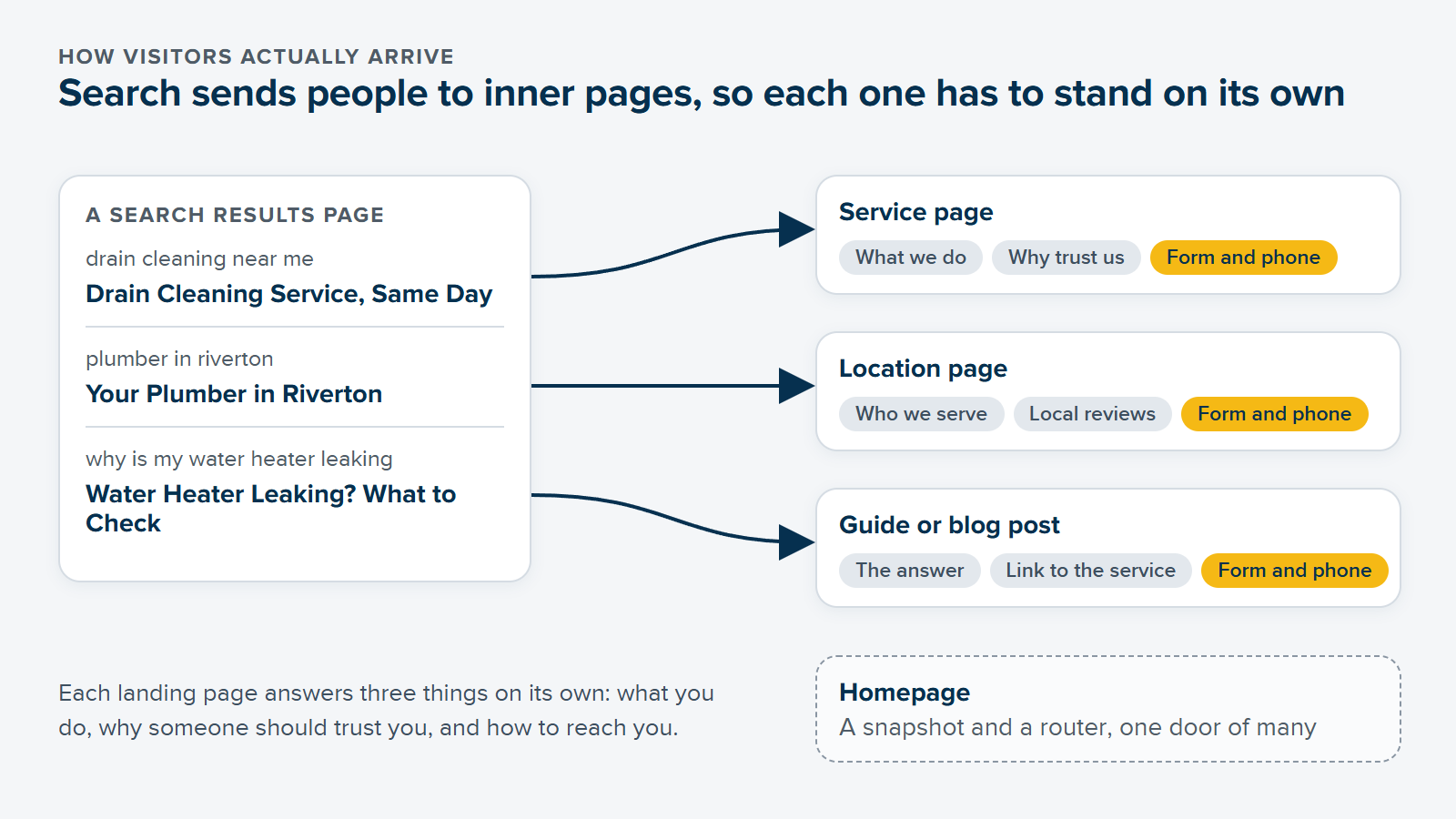
That is the design reason. The SEO reason is that Google needs a dedicated page to rank you for each thing you do. The clearest change across the sites we rebuilt was exactly this: the number of pages earning impressions in Google rose at about four in five of them, and the typical site went from 34 pages showing up in search to 71. More pages showing up didn’t automatically mean more clicks (that part takes time and good content), but it means more doors into the business.
Pages earning impressions in Google, typical redesigned site
More pages does not mean a messier menu. The main navigation stays short and predictable, location and area pages usually live in the footer, and deeper pages are reached from hub pages and links inside the content. I wrote up the rules we use in website navigation best practices. If a page feels a little repetitive to you, that’s usually a sign it’s doing its job.
Lock the homepage first, then write real words into real layouts
The homepage is the hardest design to approve and the most important one to get right, because it decides what every other page looks like: the fonts, the buttons, the way sections are spaced, the feel of the photos. So we start it as soon as the brief is ready, often before the web plan is final. A first homepage mockup typically comes back within one to two weeks, and the review rounds on it are the slowest part of the whole project. Once it’s locked, the remaining layouts typically take a couple more weeks, because we only need one layout per type of page (service, location, about, blog, contact), not a unique design for every page. My guide to homepage design covers what that page should actually do, and I mock up the homepage on mobile as well, because that’s where a big share of your visitors will judge it (more in mobile website design).
At the mockup stage, judge the layout, not the words. Text and images are easy to swap out later; if you start rewriting copy in round one, every revision becomes a content revision and the project crawls. That said, I never send mockups full of Lorem Ipsum. We fill the sections with realistic draft copy so you can see what each box is for (yes, AI helps us draft it faster, and a person edits every line; I explain how in AI web design). Then, once layouts are approved, the real content gets written into them. Words are the part of a redesign almost nobody budgets for, and website copywriting for a redesign explains who should write what and when.
The platform question usually gets settled here too. Match the build to the need: a customized theme can be plenty for a simple site, and a custom build makes sense when your layouts, integrations or growth plans call for it. We compare the platforms in WordPress vs Squarespace. Every industry has its own version of these layouts, too, and we wrote dedicated guides for law firm website design, contractor website design and therapist website design.
Launch Monday to Thursday, with tracking checked and the calendar in mind
Development happens on a private test site. For a custom build, coding and testing typically take around a month or so. Then comes QA: forms, links, integrations, readability and contrast (button text that disappears on a bright brand color is the classic one, and our ADA website compliance guide explains what we check during QA), plus page speed, where oversized images are almost always the first fix (see website speed optimization).
We do not launch on Fridays. Nobody is around on the weekend if something needs a quick fix. On-site SEO (page titles, meta descriptions, alt text) goes in at go-live, a second round of QA runs on the live hosting, and analytics gets checked that same day. That last one matters more than people think. It’s common for a Google Analytics property to only start recording around launch day, which leaves no “before” to compare against. And sites can show a month of almost no visits in Google Analytics while Search Console clicks held steady or grew, which is a tracking gap, not a traffic loss. Keep the old Analytics and Search Console properties, and screenshot a 90-day baseline on launch day. The full run-of-show is in our website launch checklist.
One more thing to plan for: the calendar. Across the other sites we manage, search clicks over the same four-month windows ran anywhere from 87% of their prior level (for a May launch date) to 107% (for December). So a spring launch starts with a handicap that has nothing to do with your new design, and a raw before-and-after comparison is really measuring the season.
You can’t always pick your month, and you shouldn’t hold a good site back for one. Just judge the result against the season, not against last spring’s memory.
Pair the launch with SEO work: that’s what the biggest winners had in common
If there’s one pattern I’d underline, it’s this. The redesigns that grew most were the ones where fresh SEO work started around the launch. Where the SEO program began within a few months of go-live, the typical site ran at 133% of what similar sites did over the same dates. The groups are small, so read it as direction, not a guarantee. Design and SEO are equal halves. A beautiful site with thin content won’t rank, and great content on a site that looks neglected won’t convert, because Google isn’t who’s going to call you and book.
Launch day is the start of your website, not the end. Give Google a few weeks to recrawl the new site. You’ll often see early movement in the first couple of months, and the bigger gains usually build over four to six months. After launch, the site needs plugin updates, security monitoring and new pages over time, and the conversion paths you built need watching (our website conversion rate optimization guide covers what to measure). On our projects, the handover includes the logins and a short guide to editing the site, so you’re never flying blind.
The same thinking helps when a project stalls. I split the work into a phase one and a phase two: get the pages that matter live and working, with redirects in place and a back end your team can edit, and put the extras on a list for right after launch. Something good and live beats something perfect and stuck, and the extras can always come next.
The website redesign plan for 2026, in order
- Write the goal in one sentence. Decide how you want leads to come in (calls, bookings or forms) and hand over every login on day one.
- Inventory what already works. Pull the pages, URLs and content that earn traffic, and plan to keep them; map a permanent redirect for any URL that must change.
- Build the web plan around how people search. One page per service, location or topic, each written to stand on its own, with a short main menu.
- Lock the homepage first. Approve the desktop and mobile homepage, then one layout per page type; judge layout before words.
- Write real content into real layouts. Realistic draft copy in the mockups, final copy once layouts are approved, and never paste in old copy just because it already exists.
- Test on the dev site, then launch Monday to Thursday. Forms, contrast, speed and integrations first; on-site SEO and a second QA pass at go-live.
- Protect your scoreboard. Keep the old Analytics and Search Console properties, check tracking on launch day, and compare results against the season.
- Pair the launch with SEO work and keep going. New pages, content and maintenance after launch, with phase two for anything that didn’t need to block go-live.
Before you call anyone, try one small thing: open your current site on your phone, land on a service page from Google, and ask yourself three questions. Does this page say what we do? Can I tell what to do next? Would I trust us? Wherever the answer is “sort of”, that’s where your redesign starts. And when you’re ready for a second set of eyes, our web design services are a good place to start.
“She's super creative, full of great ideas, and always goes the extra mile to make sure everything is done right.”
 Susan GeraciOhana Surf Project

Frequently asked questions
What is the best way to redesign a website?
Work in decision order. Start with one clear goal for the site, then inventory the pages and URLs that already earn traffic and plan to keep them. Build a web plan around how people search, lock the homepage design first, write real content into the approved layouts, test everything on a private dev site, and launch Monday to Thursday with tracking checked. Then pair the launch with SEO work and keep improving the site in a planned phase two.
Will I lose traffic if I redesign my website?
Not usually, if you keep what works. In our launch records the first month was calm: roughly four sites in five held or grew their search clicks, and the few that slipped typically lost about a quarter of their weekly clicks before recovering within a few weeks. The serious losses come from changed URLs without redirects, pages dropped from Google's index and lost tracking, and a launch checklist catches all three.
How much does it cost to redesign a website in 2026?
It depends far more on scope than on page count: how many unique layouts the site needs, whether it's a customized theme or a custom build, who writes the content, which integrations it has, and whether a migration is involved. Fewer unique layouts and simpler integrations cost less, whatever the build. Get quotes against the same written brief so you can compare them fairly, and ask what launch support and maintenance include.
How long does a website redesign take?
On our projects, the first homepage mockup typically comes back within one to two weeks, the remaining layouts take a couple more weeks once the homepage is approved, and coding and testing a custom build takes around a month or so. What stretches a timeline is almost always late content, slow feedback or new scope added during design review, so a clear brief and one decision maker help the most.
Is a website redesign still worth it in 2026?
Yes, when it fixes a real problem. A redesign won't guarantee more traffic on its own, and we never sell it that way. What it reliably delivers is a site that looks like your real business, earns a visitor's trust, works on a phone, is easy for your team to update and has conversion paths you can actually measure. Paired with SEO work, it also gives Google more useful pages to show.
Should I do SEO at the same time as a website redesign?
In our launch data, that was the strongest pattern. Redesigns where the SEO program started within a few months of launch ran at about 133% of similar sites over the same dates. The groups are small, so treat it as a direction rather than a promise, but planning new pages, content and on-site SEO alongside the design gives the new site its best start.