
 Clutch
 G2
G2
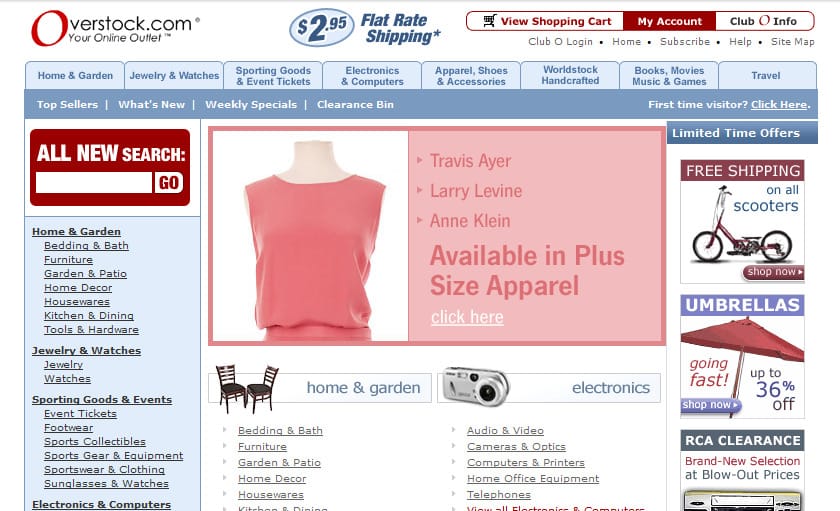
Overstock.com is an ecommerce site that sells furniture and home goods and has been online since the late 1990s. Its history is a useful case study in how a large online store survives the changing nature of the web. The screenshots below show the site in 2004 and 2014, and the trends they illustrate shaped most of what we expect from online shopping today.
How did Overstock stay a major player for so long? By being adaptable.
As technology, trends and expectations changed, so did the design and layout of the site. Adaptability is a hallmark of successful ecommerce sites, and many of them made the same changes to stay relevant and efficient. Overstock is a good snapshot of the larger world of ecommerce web design, so let’s look at how it, and ecommerce sites in general, changed over a decade and where those trends led.
Width: fixed layouts gave way to flexible ones
One of the biggest changes to Overstock.com came around 2010, when the site moved from a fixed 960-pixel layout to a full-width layout. The change was meant to introduce adaptive design so the site could work across a range of devices.
That move was an early step toward what is now standard. Today, most ecommerce sites are built mobile-first. Google indexes the mobile version of your pages by default, and a large share of online shopping happens on phones, so a store has to work well on small screens before it is adapted to large ones.
Immersion: bigger layouts hold attention
The wider layout also made the experience more immersive, something people expect more and more from technology. Many sites began to push immersive layouts and reduce the “chrome” (the controls), which helps hold visitors’ attention and increase engagement. The same thinking shows up today in large hero images, full-width product galleries and short product videos.

Minimalism: fewer elements, bigger products
Along with the wider layout came less clutter. Overstock’s pages had fewer elements and fewer links, which made room to feature more items and show larger images. Instead of long lists of products with many categories, links and controls, shoppers got a page of large, attractive, touch-friendly images. Minimalism suits responsive design, because simple layouts adapt easily to different screens, and it has stayed popular in web design ever since.
Flat design: realistic 3D icons gave way to clean graphics
Use the Internet Archive’s Wayback Machine, which lets you see old versions of websites, to look at Overstock in 2004. You will see many small icons made from photographs of the products, with a 3D feel that was once all the rage in web design.
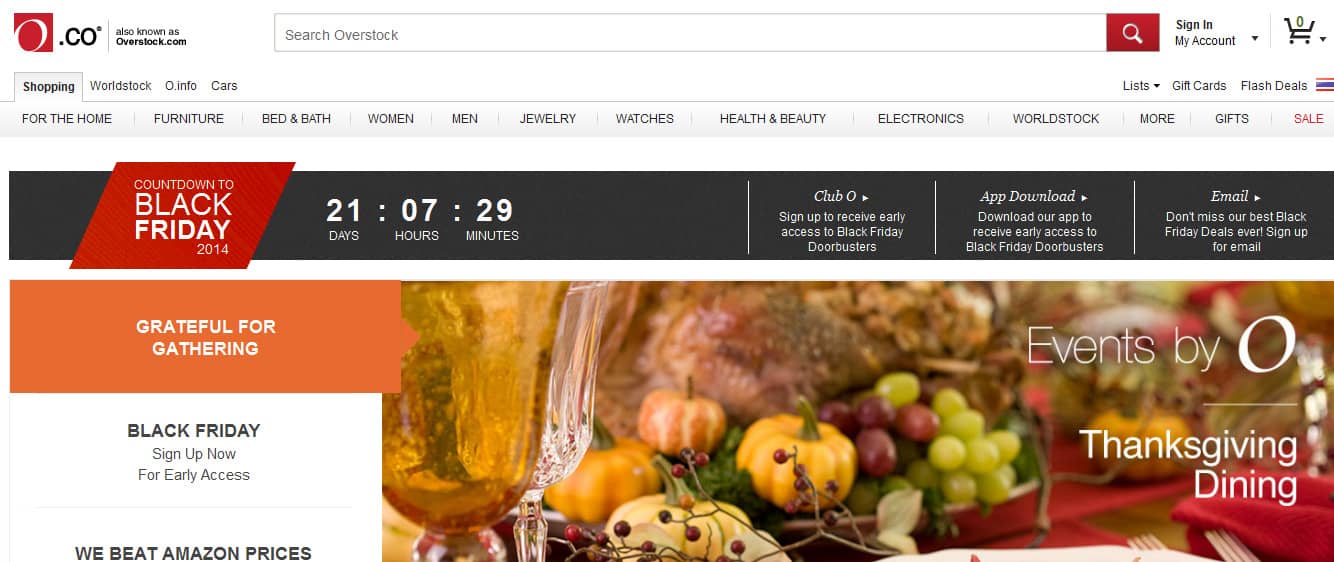
By 2014, the site used flat icons and banners with plain text. That matched the broader move toward flat, minimal design popularized by Apple’s redesign of iOS, which moved away from skeuomorphic styling. Flat design has since matured: current interfaces keep clean lines but add subtle depth, shadow and motion to show what can be tapped.
What came next: speed, product media and personalization
Since these screenshots were taken, ecommerce design has continued to move in the same direction. Page speed is now a core part of the experience and a ranking factor through Core Web Vitals. Product pages rely on high-quality photography, zoom, 360-degree views and video. Stores also personalize product recommendations and search, and shoppers increasingly discover products through AI-powered search and shopping tools, which makes clean product data and clear page content more important.
Study how sites change to stay one step ahead
Looking at how a website has evolved is a great way to see where web design is heading, and that can help you stay ahead of the curve. If you want your own store to adapt, start by checking how it looks and loads on a phone, then simplify wherever you can. If you need help with your ecommerce development, the team at SmartSites will be happy to assist. Get a Free Proposal to get started.
“We are already seeing significant improvements to our site. We're confident that as we continue to collaborate and expand our efforts, the results will become even stronger.”
 Allen ChenAquasure